
Modules
Stats
Track messages, voice time, members, online status and invites, then read them as cards, charts and leaderboards in chat or on the dashboard.
Stats counts what happens in your server: messages, time in voice, who is online, and who joins, leaves and through which invite. You read the numbers as cards and charts in chat, or as pages on the dashboard.
Dexy only counts. It never stores what anyone writes, so the numbers are all there is.
The Stats module is on by default. Activity roles and invite tracking are part of it.
Set up Stats#
Tracking starts on its own, so setting up is about how the numbers read. It takes a couple of minutes.
- Run
d!diagonce after adding Dexy. It checks the permissions Stats needs and lists channels Dexy can't see, which means they aren't tracked. - On the dashboard, open your server and go to Stats ▸ Settings.
- Under Time range, pick your Timezone, so days start at your midnight. Pick a Default period too: what cards and pages show when nobody chooses one (14 days unless you change it).
- Under Filters, choose what stats show: members, bots or both, channels to leave out, and which voice states count as voice time.
- Press Save changes in the bar at the bottom.
Read your stats on the dashboard#
Open your server on the dashboard. Every page under Stats has the same bar at the top: the period menu, and a Count bots switch.
- Start with Stats ▸ Overview: messages, voice time, members and the top members and channels for the period.
- Click the period button to look at another stretch of time: a preset like 7 days or 30 days, or two dates under Custom dates.
- Open Stats ▸ Messages or Stats ▸ Voice for that activity over time, with the most active members and channels.
- On a busy chart, press Moving average and pick a number of days to smooth the line out. Your averages are remembered in this browser.
- Open Stats ▸ Members and pick a member to see their messages, voice time, server ranks and the channels they use. Stats ▸ My stats is the same page for you.
- Open Stats ▸ Channels and pick a channel, voice channel or category for its activity and its top members.
Stats ▸ Status shows who was online over time, and Stats ▸ Invites shows joins through each invite (see Invite tracking).
Read your stats in chat#
Every page above has a command too. They answer with a card: an image with the numbers, top lists and a chart.
- Type
d!serverfor the server overview:
Live in Discord

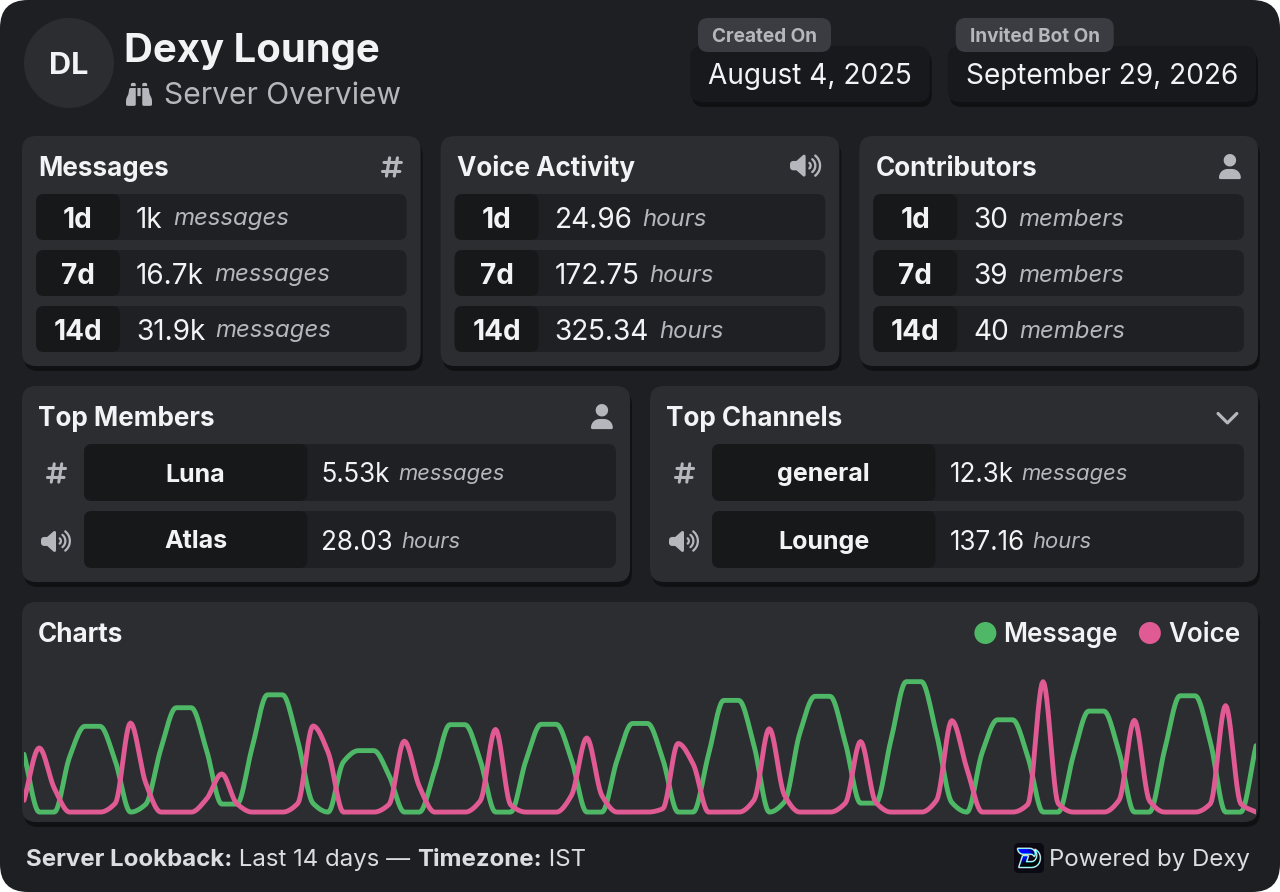


Live in Fluxer
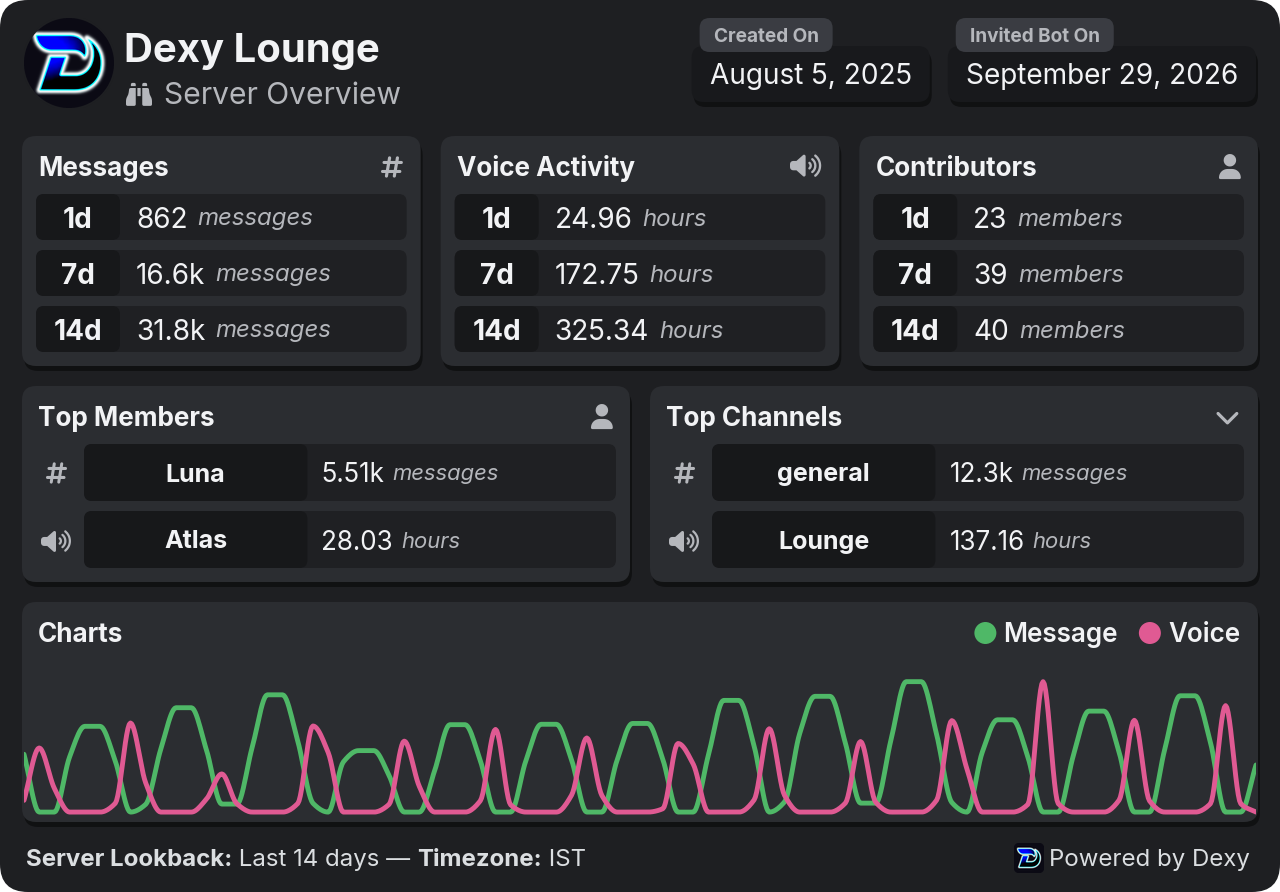
- Type
d!mefor your own card, ord!user @Orionfor someone else's:
Live in Discord
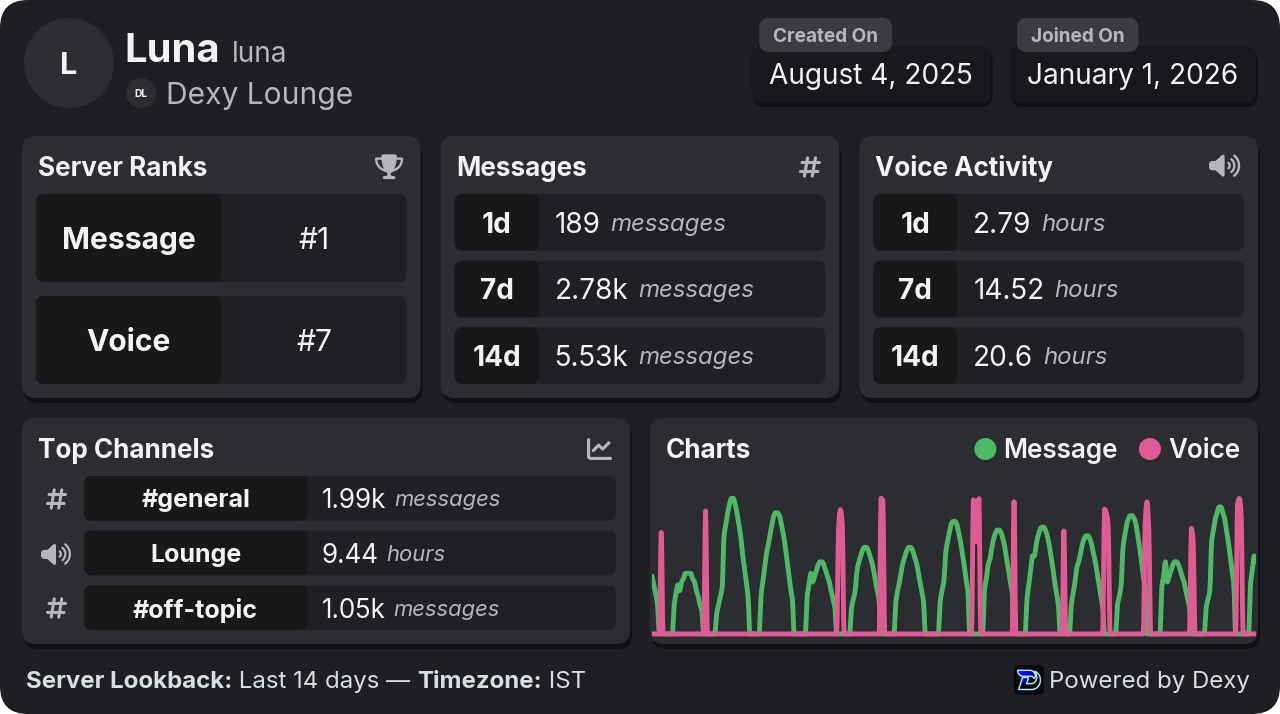

Live in Fluxer
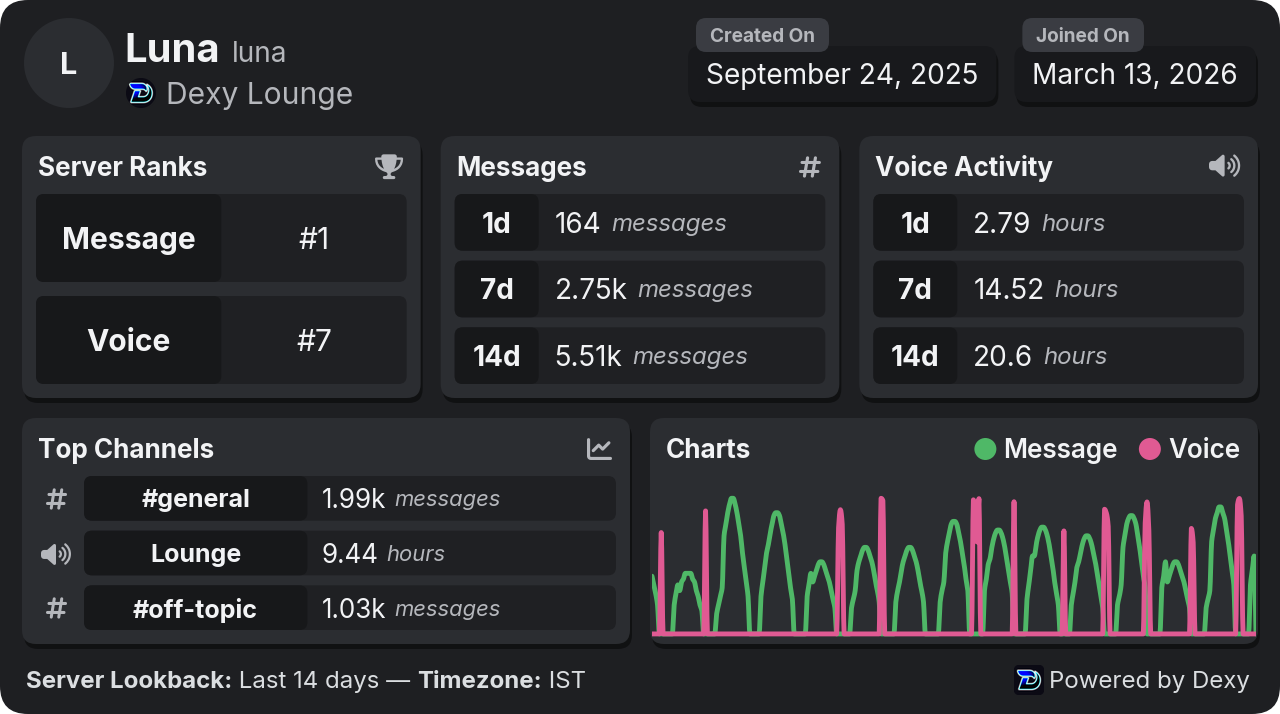
- React under a card to change it: ⏰ picks today, 7 days or 30 days and 🔄 refreshes it. See Stat cards for the rest.
The sections below explain every card, chart and leaderboard.
What is tracked#
Tracking starts the moment Dexy joins your server. There's nothing to switch on.
- Messages: one count per member, channel and hour. Normal messages and replies count; system messages and webhook messages don't. Messages in threads and forum posts count toward their parent channel.
- Voice time: minutes per member, channel and hour while someone is connected, along with the voice state they were in (talking normally, muted, deafened, streaming or in the AFK channel).
- Members: joins, leaves and the member count over time, with the invite each member used. See Invite tracking. Members who join or leave while Dexy is offline are counted when it's back (see The member chart).
- Online status: how many members are online, idle, on do not disturb or offline, sampled through the day.
Bots are tracked like everyone else, but stats leave them out by default. That's a display filter, so you can show them any time.
Stats start when Dexy started counting. To bring in older messages, use the history import.
Channels that aren't tracked#
Dexy can only count what it can see. A channel Dexy can't view isn't tracked, and d!diag lists those channels.
To stop tracking a channel on purpose, ignore it:
d!settings ignore add #spam
d!settings ignore remove #spam
d!settings ignore add #spam
d!settings ignore remove #spam
Ignored channels aren't recorded at all while they're ignored, and that activity can't be brought back later. A category doesn't cover the channels inside it, so list each channel. If you only want to hide a channel from stats, use a display filter instead.
When the Stats module is off#
With the Stats module turned off (d!modules disable stats), Dexy stops tracking messages and voice time in your server and the Stats commands answer that the module is off. Activity roles that need activity don't run either. Turning Stats back on resumes tracking from that moment; the gap isn't filled in.
Stat cards#
Every card is an image with numbers, top lists and a chart. React to it to change it:
- ⏰ pick another period: 1️⃣ today, 7️⃣ 7 days or 🗓️ 30 days (◀️ goes back). For any other period, type it after the command, like
d!me 90d - 📈 switch to the full chart, 🔭 switch back to the card
- 🔄 refresh
| Command | What it shows |
|---|---|
d!server | The overview: messages, voice time, contributors, top members and channels, and a chart |
d!me | Your own card: server ranks, messages, voice time and top channels |
d!user @Orion | Someone else's card (the same as d!me, for them) |
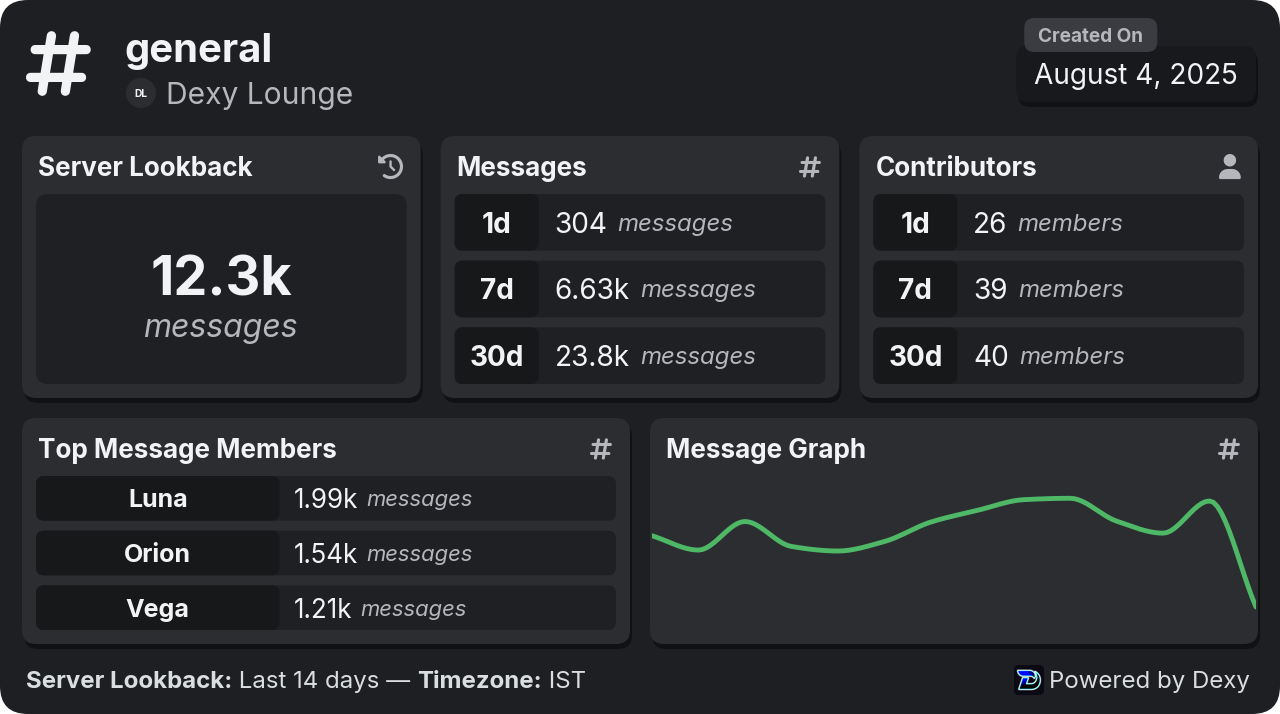
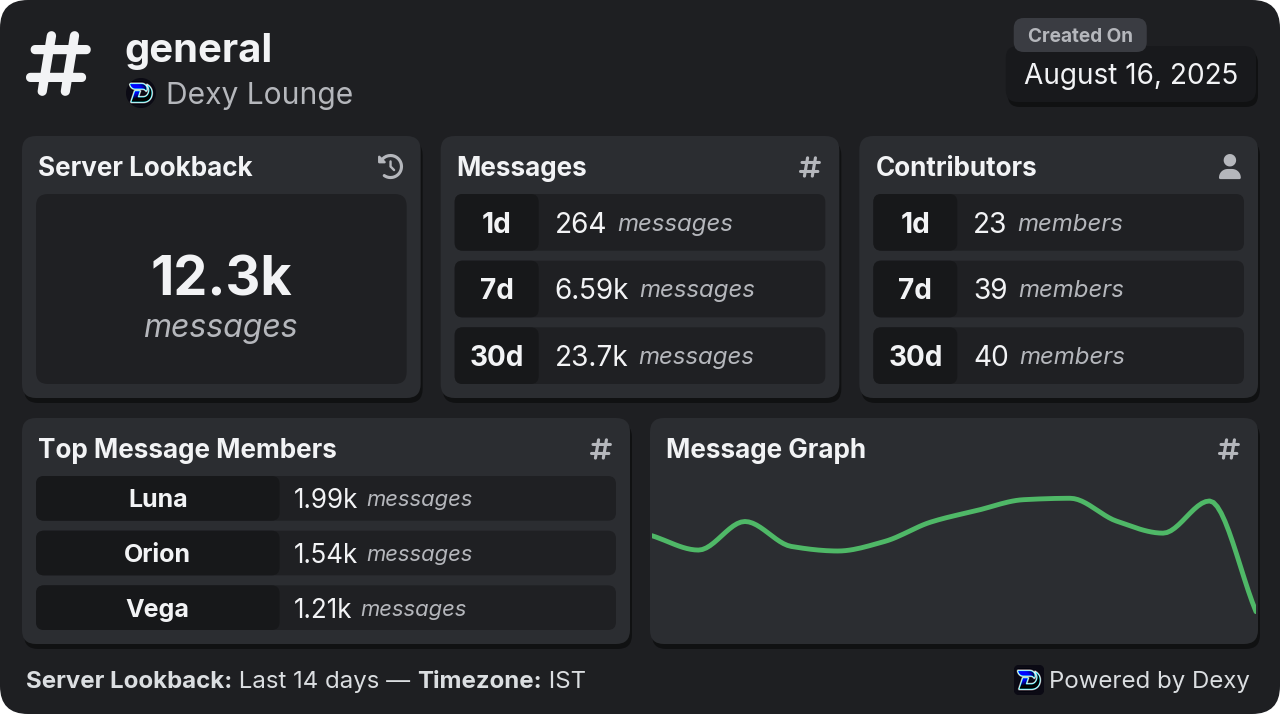
d!channel #general | One channel's messages or voice activity, contributors and top members |
d!messages | The server's message totals, recent activity and top members and channels |
d!voice | The same for voice time |
d!stats | A list of card types to pick from with reactions |
A category works with d!channel too: its card adds up every channel inside it.
Every one of these takes an optional period, like d!me 7d or d!channel #general 30d. Without one, the card uses the server's default range.
Here's d!channel #general, one channel's card:
Live in Discord
Live in Fluxer
Not sure which card you want? d!stats asks with reactions:
Live in Discord
 Which stats?
 for the overview and
 Live in Fluxer
 Messages — the server's message stats
 Voice — the server's voice stats
 User — your own stats (add
  Channel — this channel's stats (add
  Cancel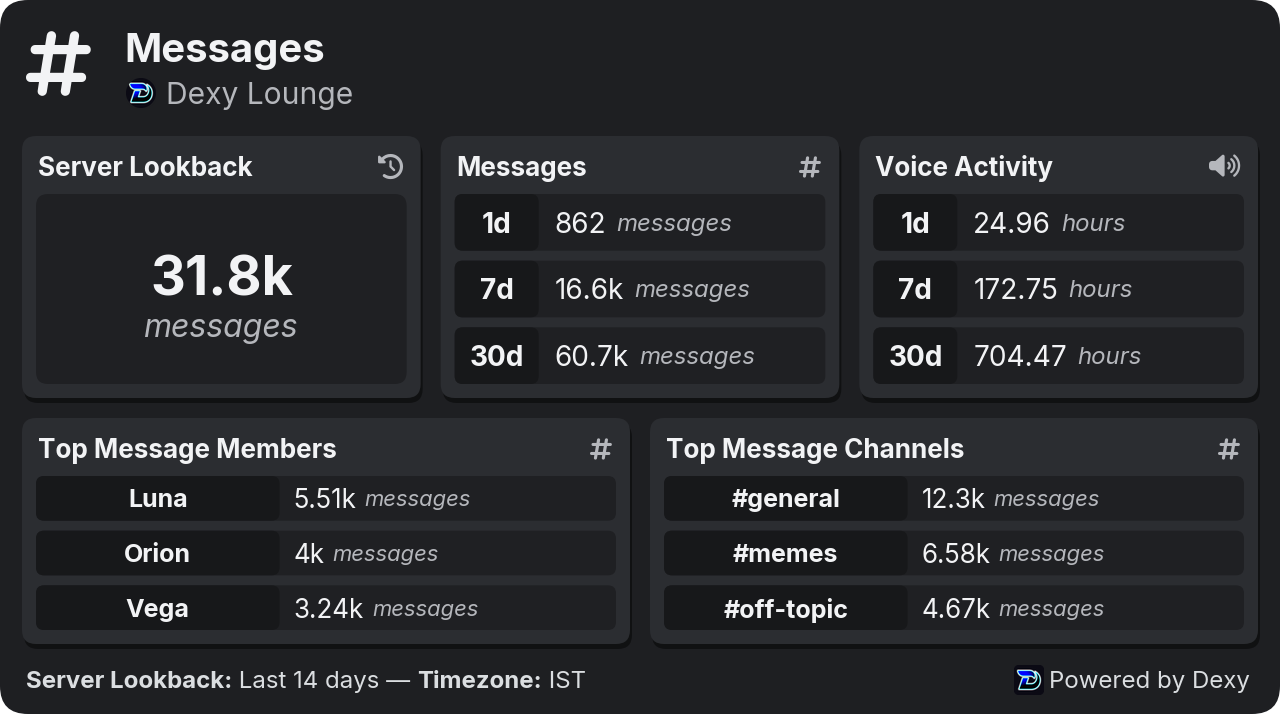
Charts#
d!chart draws a chart over time. Say what to chart, and optionally who or which channel, and the period. The arguments can come in any order.
d!chart
d!chart message 30d
d!chart user @Orion 7d
d!chart channel #general
d!chart invite 30d
d!chart status today
d!chart
d!chart message 30d
d!chart user @Orion 7d
d!chart channel #general
d!chart invite 30d
d!chart status today
| Kind | What it charts |
|---|---|
member | The member count, with joins and leaves (the default) |
user | One member's messages and voice time |
channel | One channel's messages |
invite | Joins per invite link |
message | Server messages and contributors |
voice | Server voice time and contributors |
status | How many members were online, idle or on do not disturb |
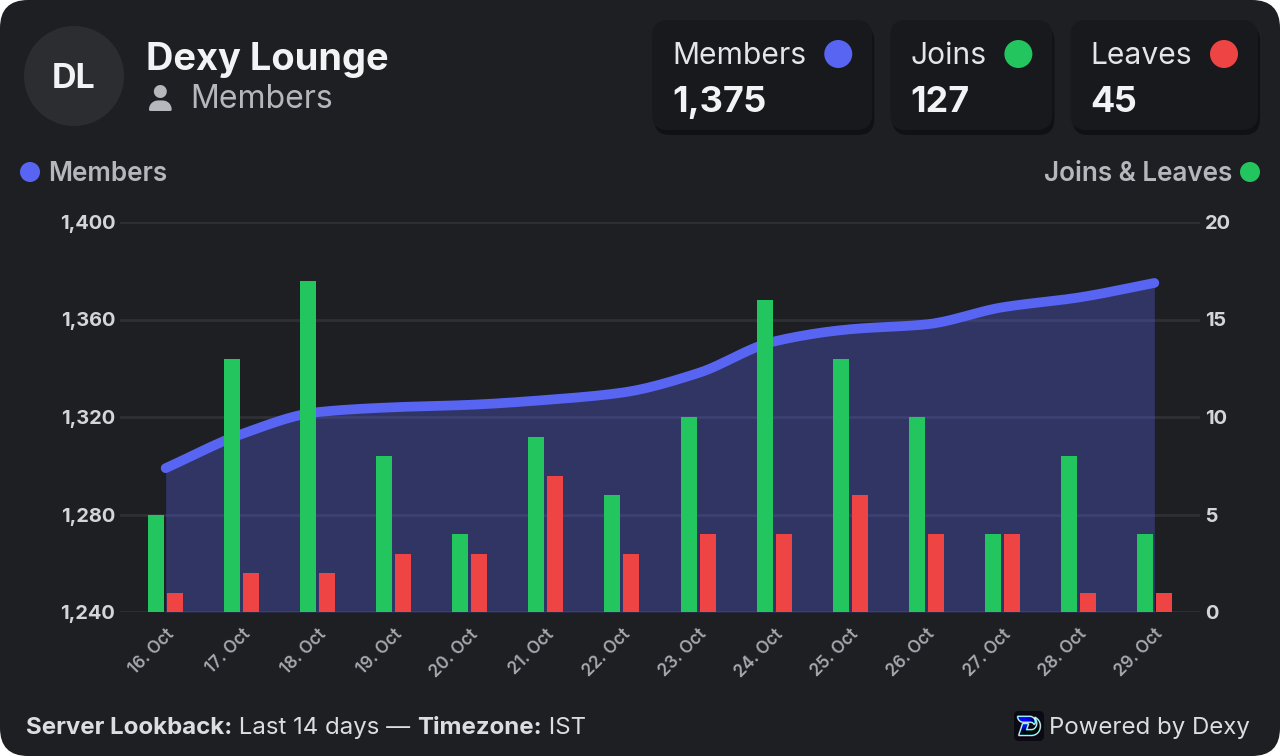
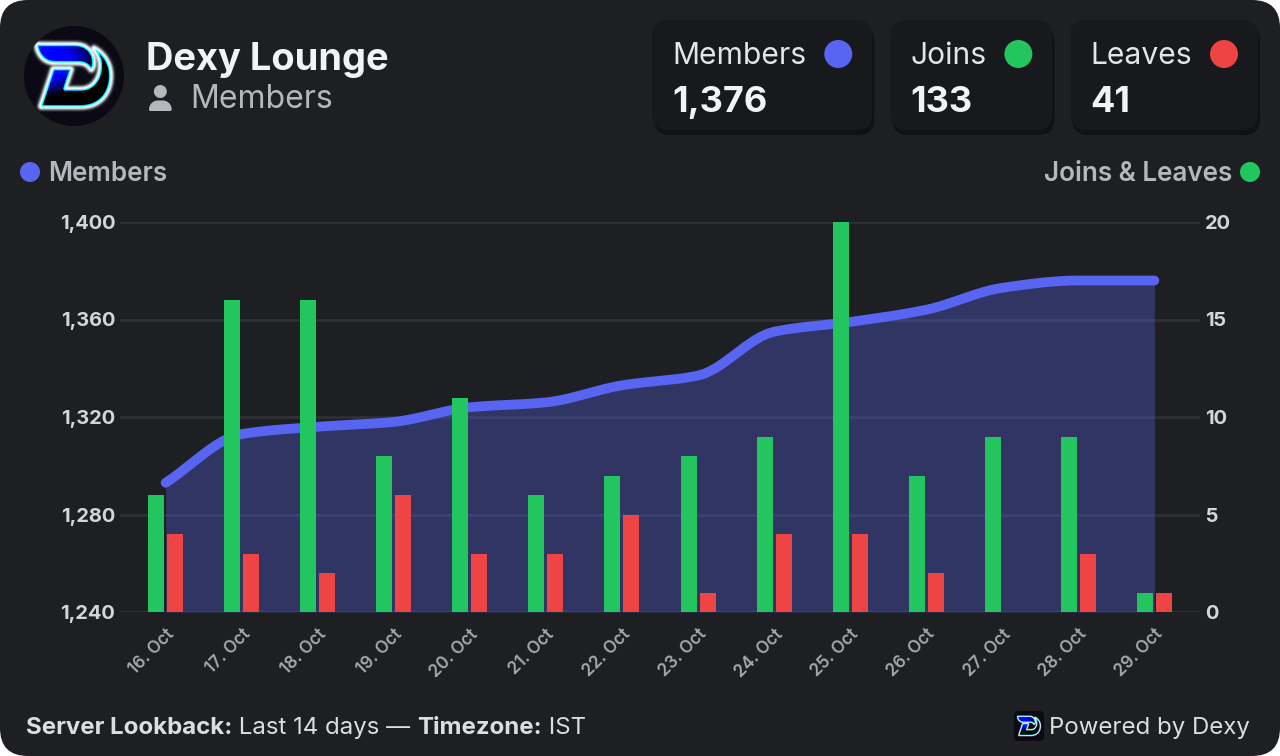
Charts begin when Dexy started tracking, so there are no empty days before it joined. Here's the member chart, d!chart members:
Live in Discord
Live in Fluxer
On the dashboard, every stats page starts with its charts for the period you picked.
The member chart#
The line is the member count, and the green and red bars are joins and leaves (right-hand scale). The three numbers at the top are the count at the end of the line and the joins and leaves added up.
- The line is always drawn. The count only changes when someone joins or leaves, so it stays flat in between, also through hours when Dexy was offline. It starts where tracking started, and a period of one hour still shows a short line.
- Bots are left out of both, by default. The line then counts people only, like the joins and leaves. Turn on Count bots (or
d!filter bots all) to count everyone, bots included. Counts from before Dexy kept the number of bots work it out from when each bot joined and left, so the line has no jump where the record starts. - Joins and leaves while Dexy was offline are counted once it's back. A leave is counted when Dexy noticed it, right after it started again, and that's also where the line drops. A join is counted on the day the member joined, with an unknown invite. Neither posts a join or leave log, since it would arrive late.
Leaderboards#
d!top ranks the most active members and channels.
d!top
d!top voice 7d
d!top channels 30d
d!top messages 30d 2
d!top
d!top voice 7d
d!top channels 30d
d!top messages 30d 2
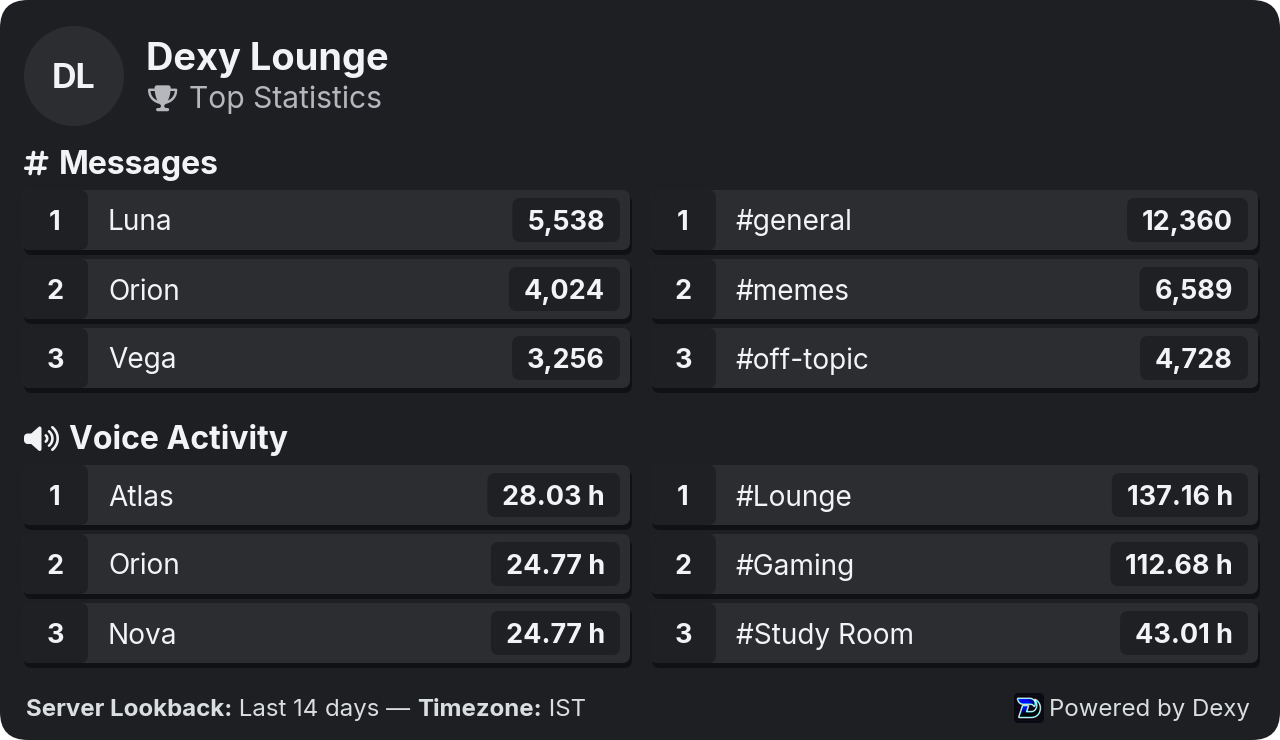
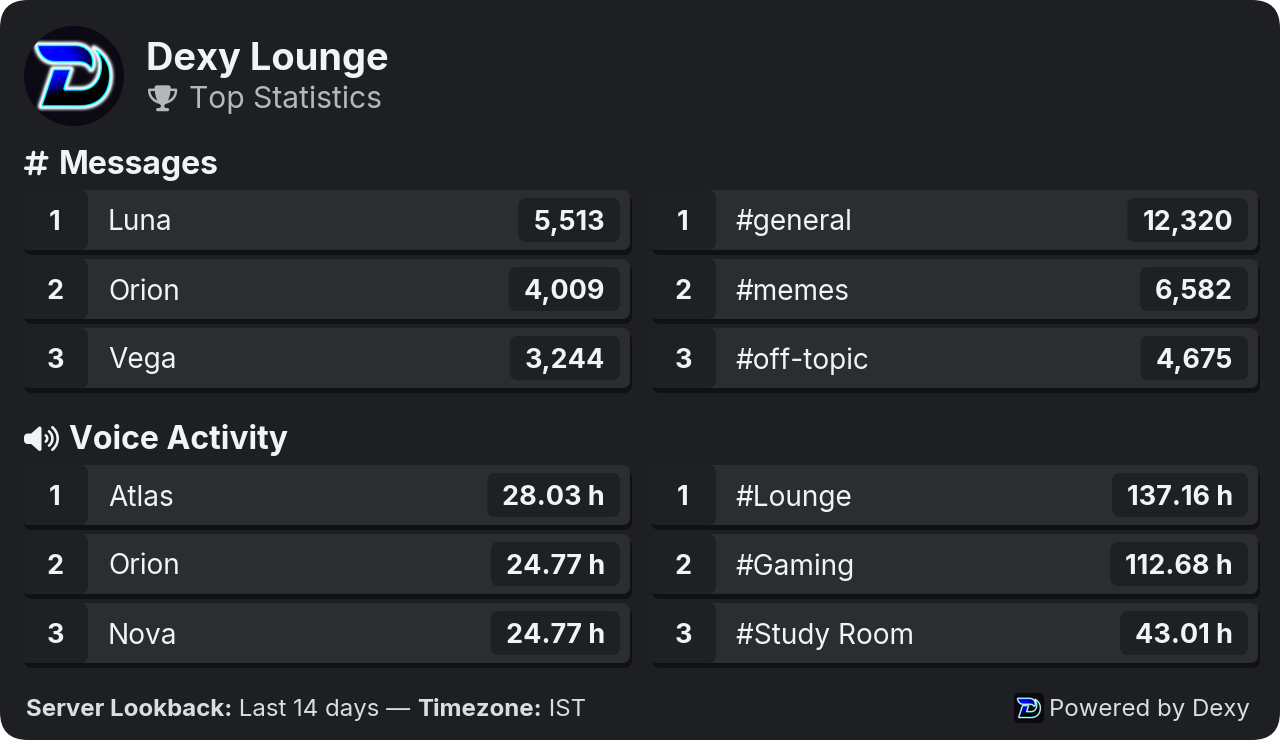
On its own, d!top shows a summary: the top 3 members and channels for messages and for voice. React 📋 for a menu of every leaderboard, and ⏮️ ◀️ ▶️ ⏭️ to change page. Each page has 10 entries.
Live in Discord

Live in Fluxer
On the dashboard, Stats ▸ Messages and Stats ▸ Voice list the top members and channels for the period.
Periods, timezone and units#
Commands that take a period accept:
today,yesterdayor24h- a number of days or weeks:
7d,30d,2w - a start date,
2026-09-01, or two dates,2026-09-01..2026-09-30 all, everything since Dexy started counting
Under a card, ⏰ only offers today, 7 days and 30 days. Any other period is typed with the command, like d!chart members 90d or d!top 2026-09-01..2026-09-30, and the card keeps it when you refresh it or switch between the card and the chart.
When nobody types a period, Dexy uses the server's default range, 14 days unless you change it:
d!settings range 30d
d!settings range 2026-09-01
d!settings range all
d!settings range 30d
d!settings range 2026-09-01
d!settings range all
Three more settings decide how stats read:
- Timezone: days, "today" and chart dates follow this clock. The default is UTC. Use an IANA name like
America/Toronto:d!settings timezone America/Toronto. - Chart steps: one point per hour or per day.
autouses hours for up to 2 days and days for longer:d!settings interval auto. - Voice time in: minutes, hours or days:
d!settings units hours.
On the dashboard these are under Stats ▸ Settings ▸ Time range (Default period, Chart steps, Timezone and Voice time in). Anyone can still pick another period with ⏰ on a card or the period menu at the top of a stats page.
Display filters#
Filters decide what stats show. They never change what is tracked, so you can change them back any time and the numbers return.
- Members and bots: show members, bots or both.
d!filter bots all - Channels: leave channels out, or show only some. A category covers every channel in it.
d!filter channels add #bot-spam - Separate voice channels: give voice time its own channel list, so the channel list above only applies to messages.
d!filter voicechannels on - Members: leave members out, or show only some.
d!filter members add @Orion - Invites: leave invite codes out of invite stats, or show only some.
d!filter invites add abc123 - Voice states: which states count toward voice time.
d!filter voice -afkstops counting time in the AFK channel. - Fake joins: which flagged joins count in invite stats. See Invite tracking.
Each list works in one of two modes: blacklist (leave these out, the default) or whitelist (only these). Switch with mode, for example d!filter channels mode whitelist.
Type d!filter to see every filter at once. On the dashboard they're under Stats ▸ Settings ▸ Filters:
- Open Stats ▸ Settings and scroll to Filters.
- Change what you need: Members and bots, Channels, Voice time counts when, Separate voice channels, Members, Invites and Joins that probably aren't real.
- Press Save changes. Every stats page and card uses the new filters straight away.
A filter never hides an explicit request: d!user @Orion still shows Orion's card when Orion is filtered out, and d!channel #bot-spam still shows that channel.
Online status#
Dexy samples how many members are online, idle, on do not disturb or offline. See it with d!chart status 7d, or on Stats ▸ Status on the dashboard, where you can hide any line. "Not offline" is online, idle and do not disturb added together.
Status is only known while Dexy is running, so the time Dexy was offline is left blank on the chart rather than drawn as zero. Messages and voice time are counts, so an hour with nothing in it shows 0.
Data tools#
The Stats ▸ Data page on the dashboard tidies up your stats. You need to be able to change Dexy's settings to use it.
Channel groups#
A group counts many channels as one in leaderboards and top channels, which is handy for temporary voice channels that come and go. The channels' own stats stay as they are, so a group can be edited or deleted at any time. A server can have up to 25 groups of up to 500 channels each, and a channel can be in one group.
- Open Stats ▸ Data and press New group.
- Give it a name, like "Temporary voice", and add its channels.
- Press Save group. Leaderboards and top channels now show the group as one channel.
Merge stats into one channel#
A merge moves everything recorded in some channels into another one, for good: for example old or deleted channels into the one that replaced them. This can't be undone. One merge runs at a time.
- On Stats ▸ Data, under Merge stats into one channel, add the channels to Move the stats of.
- Pick the channel they go Into.
- Tick I understand this moves the stats for good and press Merge.
History import#
The history import counts messages sent before Dexy started tracking, so your stats start further back. Dexy reads every text channel it can see, newest first, and counts messages the way live tracking does. It never stores what they say.
- On Stats ▸ Data, under Import message history, type how many days before Dexy joined to import.
- Press Start import. A progress bar shows the channels done and the messages counted; Stop cancels it.
Only messages from before tracking started are counted, so nothing is counted twice, and running it again later only adds older messages. Cancelling keeps what was already imported. Voice time and threads can't be imported. Dexy needs Read Message History in the channels it imports.
You can import up to 30 days back.
Export members by role#
Download a CSV of everyone who has at least one of some roles: user ID, username, display name, join date and which of the roles they have. It's the same file as d!info roles @Mods, and it needs Manage Roles.
Who can see stats#
d!settings accessdecides how far members can go with commands:everyone(the default),restricted(server stats for all, other members' cards only for admins),self(members only see their own stats) oradmins.d!settings dashboarddecides who can open the server's stats pages on the web:admins(the default),membersorpublic. Member details stay for people in the server, even on a public dashboard.
See Permissions for roles that can view stats or change settings without being admins.
Common setups#
A server with a busy bot channel. Hide it from stats but keep it tracked: d!filter channels add #bot-commands.
Temporary voice channels. Make a channel group on Stats ▸ Data so they count as one channel in leaderboards. When a temporary channel is gone for good, merge it into the group's main channel.
Weekly leaderboard posts. Set the default range to a week, d!settings range 7d, so d!top and every card cover the last 7 days unless someone types another period.
Members can only see their own numbers. d!settings access self.
Limits#
- Stats can be viewed up to 30 days back, and leaderboards show up to 100 entries.
- A period like
allis shortened to what can be shown. - Display filter lists hold up to 200 members, roles or invite codes; channel lists hold up to 50 channels in commands.
- Card commands have a short cooldown (8 seconds per member).
Troubleshooting#
A channel shows no activity. Check that Dexy can view it (d!diag lists channels it can't see), that it isn't ignored (d!settings ignore) and that no filter hides it (d!filter).
Numbers look lower than expected. A display filter may be leaving members, bots, channels or voice states out. Type d!filter to see them. Voice time only counts the voice states that are on.
Days look shifted by a few hours. Set your timezone: d!settings timezone Asia/Kolkata.
Charts start recently. Stats begin when Dexy joined. Import older messages with d!history import 30.
The commands say the module is off. An admin can turn Stats on with d!modules enable stats, or on the dashboard's Overview.
A card doesn't arrive. Dexy needs to send messages and attach files in the channel. d!diag checks this for the channel you run it in.
Commands#
| Command | What it does | Needs |
|---|---|---|
| activityroles | Show this server's activity roles: roles members get while they meet a rule's conditions.list · preview · run | — |
| channel | Show a channel's stats card: messages, contributors or voice activity, top members and a chart. | — |
| chart | Draw a chart over time of members, a member, a channel, invites, messages, voice activity or online status. | — |
| filter | Show the display filters: which members, channels, voice states and invites stats show.bots · channels · invites · members · reasons · voice · voicechannels | — |
| me | Show your own stats card: server ranks, messages, voice activity, top channels and a chart. | — |
| messages | Show the server's message stats card: the total, recent activity, and the top members and channels. | — |
| server | Show the server overview card: messages, voice activity, contributors, top members and channels, and a chart. | — |
| stats | Open a stats card: pick which stats with `stats message`, `voice`, `user` or `channel`.channel · message · user · voice | — |
| top | Show leaderboards of the most active members and channels. | — |
| user | Show a member's stats card: server ranks, messages, voice activity, top channels and a chart. | — |
| voice | Show the server's voice stats card: total voice time, recent activity, and the top members and channels. | — |
Full details for each: Stats command reference.
Settings#
| Setting | What it does | Default |
|---|---|---|
| Timezonetimezone | The clock every day, “today” and chart follows. A day starts at midnight in this timezone. | UTC |
| Default rangedefault_range | The period stats show when nobody picks one: in commands, on cards and on these pages. | 14d |
| Chart intervalinterval | How charts group their numbers along the bottom. | Automatic |
| Voice time unittime_unit | How time in voice is written in stats. | Hours |
| Ignored channelsignored_channels | Channels Dexy doesn't record at all: messages and voice time there never count anywhere. | None |
| Members shownmember_types | Which accounts appear in stats by default. | Members |
| Channel filterchannel_filter | Which channels count in stats by default. Picking a category covers every channel in it. | None |
| Channel filter modechannel_filter_mode | How the channel filter list is used. | Blacklist |
| Separate voice channel filterseparate_voice_filter | Use one list for text channels (messages) and another for voice channels (time in voice). | Off |
| Voice channel filtervoice_channel_filter | Which voice channels count for time in voice. Text channels use the list above. | None |
| Voice channel filter modevoice_channel_filter_mode | How the voice channel filter list is used. | Blacklist |
| Member filtermember_blacklist | Which members count in stats by default, e.g. to leave out a member who spams. | None |
| Member filter modemember_filter_mode | How the member filter list is used. | Blacklist |
| Invite filterinvite_filter | Which invite links count in invite stats. | None |
| Invite filter modeinvite_filter_mode | How the invite filter list is used. | Blacklist |
| Fake-join whitelistreason_whitelist | Dexy marks joins that probably aren't real. Use the two lists to decide which joins invite stats count. | None |
| Fake-join whitelist matchreason_whitelist_match | How the fake-join whitelist list is used. | Any |
| Fake-join blacklistreason_blacklist | Dexy marks joins that probably aren't real. Use the two lists to decide which joins invite stats count. | None |
| Fake-join blacklist matchreason_blacklist_match | How the fake-join blacklist list is used. | Any |
| Voice states countedvoice_states | Time in voice only counts while a member is in one of the ticked states. | AFK, Server deafened, Self deafened, Server muted, Self muted, Streaming, Normal |
Values, limits and who can change each: Stats settings reference.